

Never miss a meeting, a scheduled trash cleanup, or forget to cancel a contract
Keep your board's full event calendar in one place — with automatic reminders for directors, owners, and members.
Benefits
Why boards use BoardSpace for events
Nothing slips through the cracks
Automatic reminders go out before every event — to directors, owners, or members, depending on who needs to know. Contract renewals, AGMs, maintenance schedules — all covered without anyone having to remember to follow up.
Events and meetings work together
Add any event to a meeting agenda with one click — so your board can discuss an upcoming AGM, a contract, or a roofing project without switching between systems or copying information across.
Your owners and members stay informed too
Share select events with unit owners or association members and send them reminders directly — all from within BoardSpace. One less email thread to manage, one less thing to forget.
features
What's included
Every feature is designed around how boards actually schedule, share, and follow up on events and activities.
Setting up events
Recurring events
Set events to recur automatically — weekly, monthly, annually, or on a specific pattern like the first Monday of every month. After the current event passes, the next one is set automatically. No manual resetting.
Attach documents
Attach supporting documents directly to an event — agendas, contracts, venue details, or any relevant files — so everything related to it is in one place rather than scattered across email threads.
Sharing events
Share with owners and members
Choose which events to share with unit owners or association members. They receive an email notification and can add the event directly to their Google or Outlook calendar.
Add to meeting agenda
Add any event to a meeting agenda with one click — useful for flagging an upcoming AGM, contract renewal, or maintenance project that needs board discussion. It appears at the bottom of the agenda instantly.
Reminders
Flexible reminders
Set the number of reminders and their timing yourself. You control who gets notified — directors only, or owners and members too — and how many reminders go out before the event.
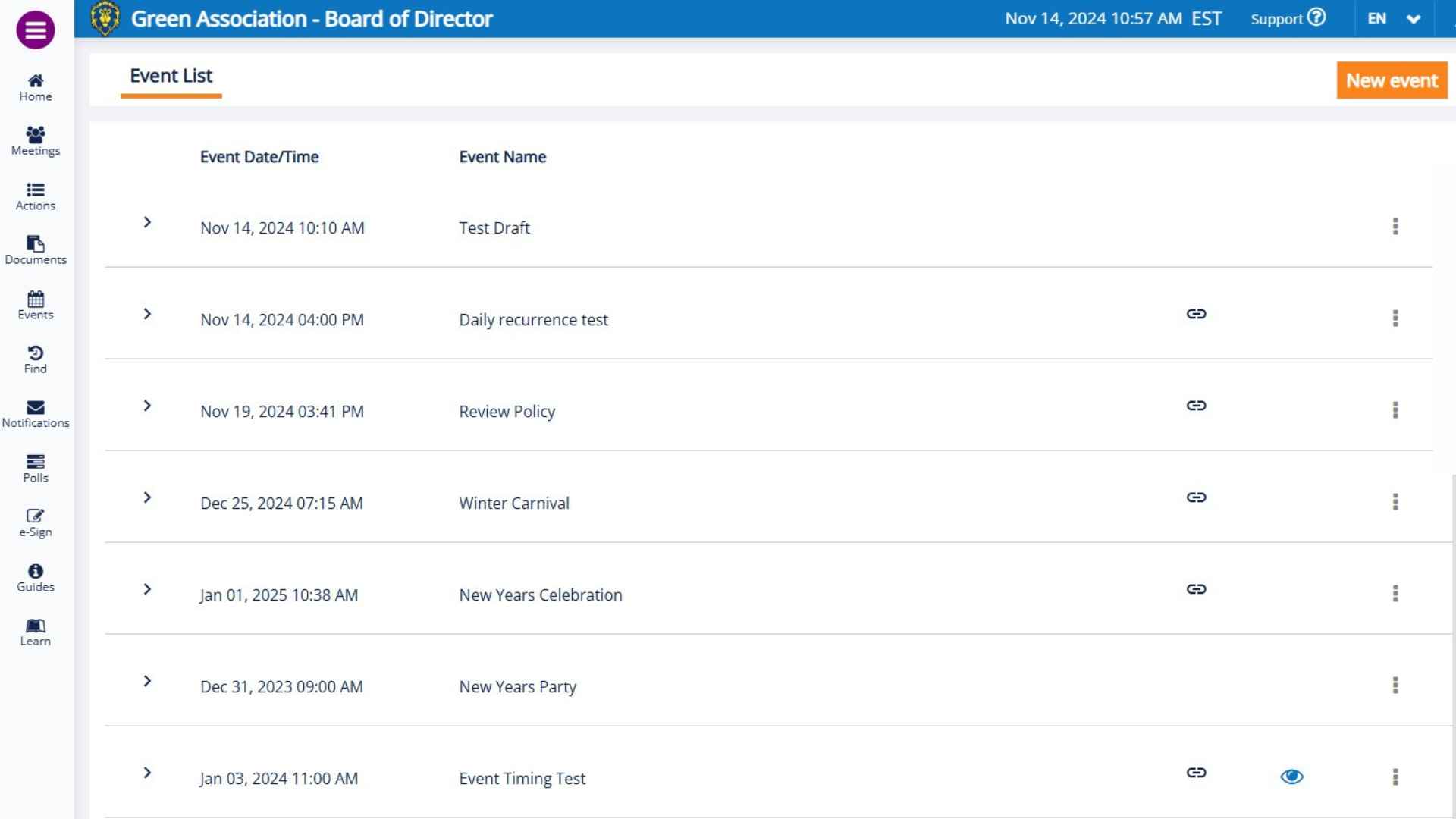
Events overview
A clear view of everything coming up — meetings, deadlines, community events, and contract renewals — so your board is never caught off guard by something that was always on the calendar.
Every upcoming meeting, deadline, and community event with date, time, location, and reminder status at a glance.
Frequently Asked Questions
Everything you need to know about how BoardSpace keeps your board's calendar organised and your community informed.
Can I set an event to recur automatically?
Yes. Events can be set to recur yearly, monthly, weekly, or on a specific pattern — like the first Monday of every month. After the current event passes, the next one is set automatically. No manual resetting required.
Can I send multiple reminders?
Yes. You set the number of reminders and their timing yourself. You can send as many reminders as you like, spaced however far apart makes sense for the event — a contract renewal might need reminders 30 days and 7 days out, while a board meeting might just need one the day before.
Who can I send reminders to?
You choose. Reminders can go to directors only, or you can include unit owners and association members for events that are relevant to the whole community — an AGM, a maintenance day, or a community social event, for example.
Can I add an event to my Google or Outlook calendar?
Yes. When an event is created, an email is sent with a link to add it to Google Calendar or to download an iCal file for Outlook. Directors and members can keep their personal calendars in sync without any extra steps on your end.
How do I add an event to a meeting agenda?
Click on the event and select the correct meeting date. The event is added to the bottom of the agenda instantly — useful for flagging an upcoming AGM, contract renewal, or maintenance project that needs board discussion.
Can I attach documents to an event?
Yes. Supporting documents — agendas, contracts, venue details, and quotes — can be attached directly to any event, so everything related to it is in one place rather than scattered across email threads.
Can owners or members see all board events?
No. You control which events are shared with owners or members. Board-only events remain private. You choose on an event-by-event basis what the broader community can see.
Related Resources

Tips to Buying Board Management Software
Buying board management software for your organization is the right step. Technology is driving change in every industry. Cloud-based software is an essential tool for today’s modern organizations.

Inside the BoardSpace Toolbox
Each episode explores a key feature—what it is, how it works, why it matters, and how real boards use it. Expect helpful tips, creative use cases, and just enough light humour to make governance feel (almost) fun.

Event Planning That Works
Managing events is more than just circling dates on a calendar. From board meetings and AGMs to filing deadlines and committee calls, well-organized scheduling is essential to keeping everyone informed.