

Good decisions deserve good follow-through
Assign actions the moment they're agreed, track progress between meetings, and make sure every decision your board makes actually gets done.
Benefits
Features
FAQs
Related Resources
Benefits
Why boards use BoardSpace for actions and projects
Never lose track of what was agreed
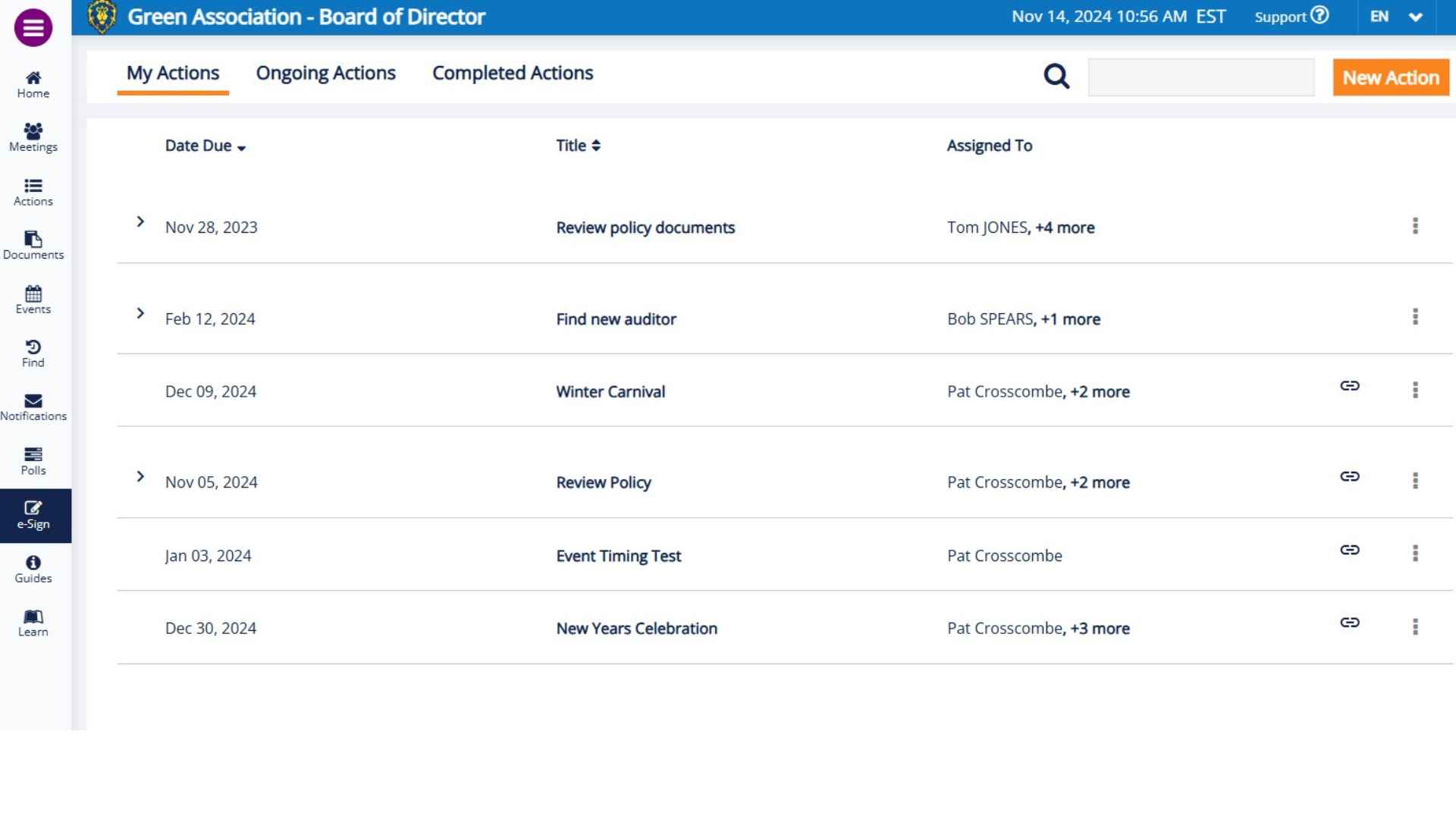
Every action item assigned during the meeting gets an owner and due date and appears immediately in the Actions list. Weekly reminders go out automatically, so nothing relies on someone's memory.
One place for everything outstanding
No more chasing people by email to find out what's been done. Every open action, its owner, its due date, and its status are visible in one view — to everyone on the board, at any time.
New directors hit the ground running
When someone joins the board mid-term, their full action history is already in BoardSpace. No handover meeting, no rummaging through old emails — everything outstanding is right there from day one.
features
What's included
Assigning
Action items
Assign action items the moment they're agreed — during the meeting or any time between meetings. Each action gets a named owner, a due date, and is immediately visible to the whole board.
Projects
Group related actions into a project and assign it to a team rather than a single person — useful for larger initiatives like an AGM, a building renovation, or a bylaw review where multiple people own different pieces.
Tracking
Automatic reminders
Weekly reminders go out automatically to whoever owns an open action. No manual chasing, no awkward follow-up emails — BoardSpace handles it so your board chair doesn't have to.
Action Review Module
Add the Action Review module to your meeting agenda and all outstanding actions appear in the minutes automatically — so your board reviews what's been done and what's still open at the start of every meeting, without any manual work.
Managing
Full flexibility
Edit any action at any time — postpone a due date, swap the assignee, or add context. Circumstances change between meetings and BoardSpace makes it easy to update without losing the original record.
Attach documents
Attach supporting documents directly to an action or project — contracts, quotes, reports — so the context is always with the task, not buried in a separate email thread.
The BoardSpace Actions tracker — every open action, its owner, due date, and current status in one view
Frequently Asked Questions
How does BoardSpace help boards stay accountable between meetings?
Every action item gets a named owner, a due date, and automatic weekly reminders. A master list of all open actions is visible to the whole board — so accountability doesn't depend on the board chair chasing people individually before every meeting. Nothing agreed in a meeting gets lost between meetings.
What's the difference between an action item and a project?
An action item is a single task assigned to one person with a due date — for example, "Get three quotes for the lobby renovation by March 15." A project is a larger initiative made up of multiple related actions, assigned to a team — for example, the lobby renovation itself, with separate actions for quotes, contractor selection, and sign-off. Projects give you a way to track complex work without losing sight of the individual steps.
How are actions tracked automatically?
Every action assigned in BoardSpace gets a named owner and a due date. Weekly reminders go out automatically to whoever owns an open action — so follow-up doesn't depend on anyone remembering to chase. A master list of all open actions is visible to the whole board at any time.
How do I include outstanding actions in the meeting minutes?
When building your meeting agenda, add the Action Review module. It automatically pulls in all of the board's outstanding actions so they appear in the minutes without any manual work — no copying and pasting from a spreadsheet.
Can I assign action items to more than 1 person?
Yes. You can assign an action to as many people as needed — useful for collaborative tasks where multiple directors or staff members share responsibility. Everyone assigned receives the same reminders and can see the same status updates.
What happens when a director leaves the board before finishing their assigned actions?
No problem. A board admin can reassign any open action to a new owner, update the due date, or add context about where things stand. Nothing gets lost when a director leaves mid-term — the full action history stays in BoardSpace regardless of who's currently on the board.
Can I assign actions outside of a meeting?
Yes. Actions can be added any time by going to the Actions list and clicking Add Action. You can assign an owner, set a due date, and attach any relevant documents — all outside of a meeting. You don't need to wait until the next board meeting to get something moving.
Can I add a comment to an action or project?
Yes. Comments can be added to any action or project — useful for flagging an update, noting a blocker, or adding context without changing the status of the action itself. The full comment history stays attached to the record so nothing gets lost.
I’m on my condo board. Can unit owners see our action items and projects?
No. Actions and projects are only visible to board members, managers, and staff assigned to the board. Unit owners and residents have no access to this section of BoardSpace.

Actions Stations: Follow-Ups That Don't Fall Flat
We’re rolling up our sleeves and diving into how BoardSpace helps boards stay accountable by turning decisions into real, trackable follow-up.

How to Track Board Action Items and Get Things Done
We're looking at how BoardSpace helps boards track action items, assign tasks, and make sure every decision leads to real follow-through.

Between Meetings — Because Decisions Can’t Wait
Decisions don’t always wait for the next scheduled meeting. Whether it’s approving emergency repairs, responding to grant opportunities, or finalizing contracts, boards sometimes need to act fast.